Networking
Network Architecture
The homelab uses a flat network topology with strategic segmentation for security and performance. All infrastructure components communicate over a single /24 network with careful firewall configuration.
Network Topology
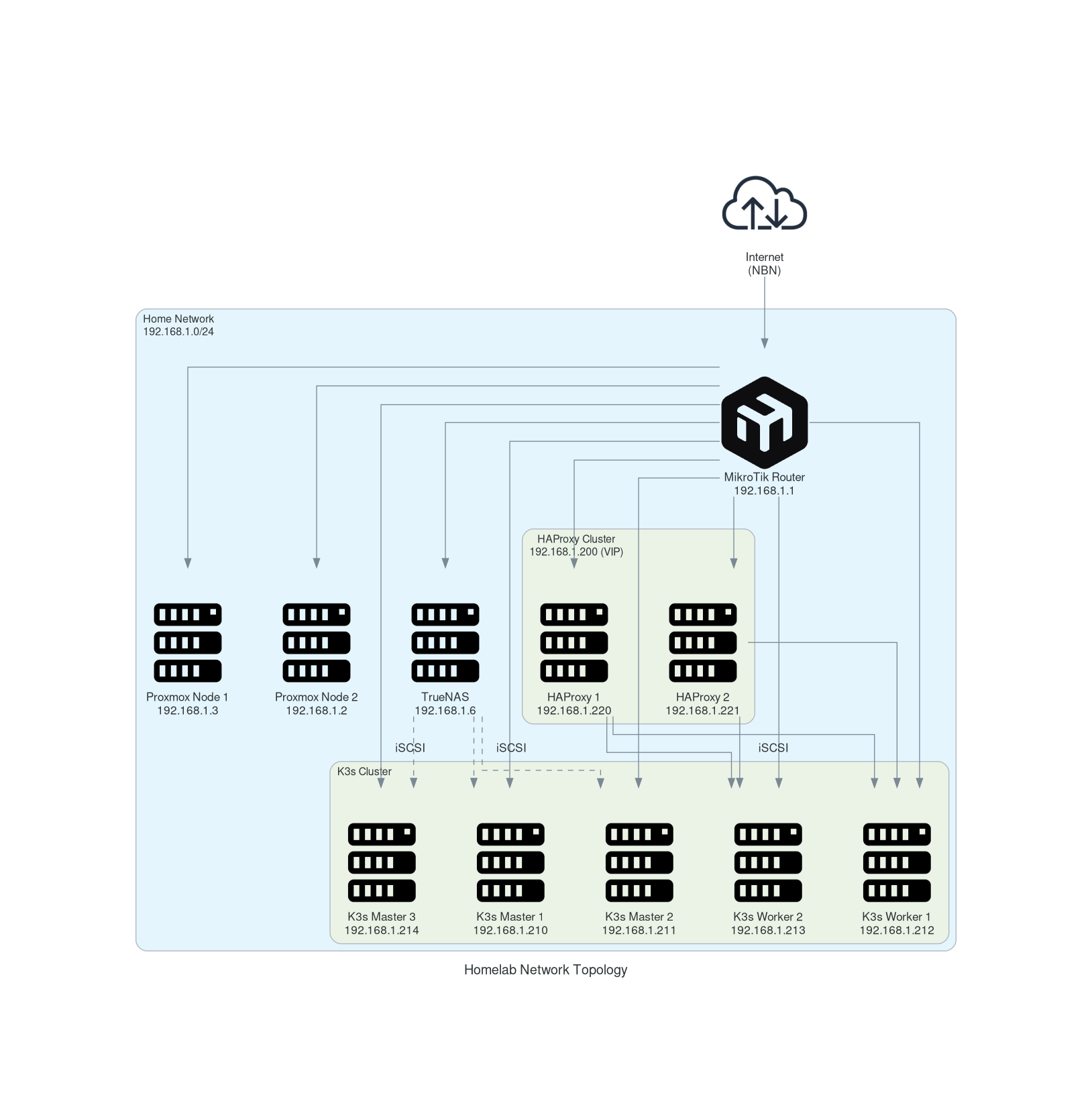
Network Segments
| Network | Purpose | Gateway | VLAN |
|---|---|---|---|
192.168.1.0/24 | Primary infrastructure network | 192.168.1.1 | Default |
192.168.20.0/24 | Camera network (isolated) | 192.168.20.1 | Camera VLAN |
192.168.3.0/24 | Wireless segment (Lounge AP) | 192.168.1.12 | - |
192.168.4.0/24 | Office network segment | 192.168.1.13 | - |
10.0.0.0/24 | Management network | 10.0.0.1 | - |
IP Address Allocation
Infrastructure Services
| Service | IP Address | Notes |
|---|---|---|
| Router | 192.168.1.1 | MikroTik RouterOS 7.18.2 |
| Proxmox Node 1 | 192.168.1.3 | Primary hypervisor |
| Proxmox Node 2 | 192.168.1.2 | Secondary hypervisor |
| TrueNAS | 192.168.1.6 | iSCSI storage provider |
| Home Assistant | 192.168.1.2 | Home automation |
K3s Cluster
| Node Type | Hostname | IP Address | Role |
|---|---|---|---|
| Master | k3s-master-01 | 192.168.1.210 | Control plane |
| Master | k3s-master-02 | 192.168.1.211 | Control plane |
| Master | k3s-master-03 | 192.168.1.214 | Control plane |
| Worker | k3s-worker-01 | 192.168.1.212 | Workload execution |
| Worker | k3s-worker-02 | 192.168.1.213 | Workload execution |
Load Balancer Cluster
| Service | IP Address | Notes |
|---|---|---|
| HAProxy VIP | 192.168.1.200 | Virtual IP (keepalived) |
| HAProxy Node 1 | 192.168.1.220 | Primary load balancer |
| HAProxy Node 2 | 192.168.1.221 | Secondary load balancer |
MAAS Deployment
| Service | IP Address | Status |
|---|---|---|
| MAAS Server | 192.168.1.230 | Partial deployment |
DNS Configuration
Internal DNS Resolution
The homelab uses a multi-tier DNS strategy:
- Primary DNS:
192.168.1.1(MikroTik router) - Secondary DNS:
192.168.1.4(Proxmox Docker VM) - Fallback:
192.168.1.2(Home Assistant)
DNS Records
All internal services use the .home.dodwell.us domain:
# Infrastructure
router.lan                    IN A    192.168.1.1
k3s-master-01.home.dodwell.us IN A    192.168.1.210
k3s-master-02.home.dodwell.us IN A    192.168.1.211
k3s-worker-01.home.dodwell.us IN A    192.168.1.212
k3s-worker-02.home.dodwell.us IN A    192.168.1.213

# Services (via HAProxy)
*.home.dodwell.us             IN A    192.168.1.200
Router Configuration
MikroTik RouterOS Setup
The homelab uses a MikroTik D53G-5HacD2HnD router running RouterOS 7.18.2.
Key Configuration:
- Bridged interfaces:
ether2-5,wlan1,wlan2 - WAN interface:
ether1(NBN connection) - DHCP server:
192.168.1.10-254range - DNS resolver: Enabled with cache
Security Features:
- Firewall: Default deny with specific allow rules
- VPN support: IPsec and OpenVPN ready
- Access control: SSH and web UI restricted to LAN
Firewall Rules
# Allow established connections
/ip firewall filter add chain=input action=accept connection-state=established,related,untracked

# Allow ICMP
/ip firewall filter add chain=input action=accept protocol=icmp

# Allow local loopback
/ip firewall filter add chain=input action=accept dst-address=127.0.0.1

# Block invalid connections
/ip firewall filter add chain=input action=drop connection-state=invalid

# Default deny from WAN
/ip firewall filter add chain=input action=drop in-interface-list=!LAN
Kubernetes Networking
CNI Configuration
K3s uses Flannel CNI with the following configuration:
- Pod CIDR:
10.42.0.0/16 - Service CIDR:
10.43.0.0/16 - Cluster DNS:
10.43.0.10
Service Exposure
Services are exposed through multiple methods:
- Ingress Controller: NGINX for HTTP/HTTPS
- LoadBalancer: MetalLB for L4 services
- NodePort: Direct node access for specific services
Load Balancing
HAProxy Configuration:
# HTTP/HTTPS to K3s workers
backend k3s_http
    balance roundrobin
    server k3s-worker-01 192.168.1.212:31282 check
    server k3s-worker-02 192.168.1.213:31282 check

backend k3s_https
    balance roundrobin
    server k3s-worker-01 192.168.1.212:32243 check
    server k3s-worker-02 192.168.1.213:32243 check
Network Security
Firewall Strategy
The homelab implements a defense-in-depth approach:
- Perimeter: Router-level firewall
- Host-based: Individual VM firewalls
- Application: Service-level security policies
Network Segmentation
Camera Network Isolation:
- Separate VLAN (
192.168.20.0/24) - Limited internet access
- Restricted inter-VLAN communication
Management Network:
- Dedicated management interfaces
- Out-of-band access for critical services
- Enhanced monitoring and logging
SSL/TLS Configuration
All services use TLS encryption:
- Certificate Authority: Let’s Encrypt
- Certificate Management: cert-manager
- TLS Termination: HAProxy and NGINX Ingress
Monitoring and Observability
Network Monitoring
Prometheus Metrics:
- Router SNMP metrics
- HAProxy statistics
- Kubernetes network policies
- Service mesh metrics
Grafana Dashboards:
- Network topology visualization
- Bandwidth utilization
- Connection tracking
- DNS query patterns
Alerting
Critical Alerts:
- Link failures
- High latency
- Certificate expiration
- DNS resolution failures
Troubleshooting
Common Issues
DNS Resolution Problems:
# Check DNS configuration
nslookup home.dodwell.us 192.168.1.1

# Verify DNS propagation
dig @192.168.1.1 grafana.home.dodwell.us

# Test recursive resolution
dig @192.168.1.1 google.com
Network Connectivity:
# Test HAProxy health
curl -I http://192.168.1.200:8404/stats

# Check K3s node networking
kubectl get nodes -o wide

# Verify service endpoints
kubectl get endpoints -A
Performance Issues:
# Network throughput test
iperf3 -s # On server
iperf3 -c 192.168.1.212 # On client

# Latency testing
ping -c 10 192.168.1.212
traceroute 192.168.1.212
Diagnostic Commands
Router Status:
# SSH to router
ssh admin@192.168.1.1

# Check interface status
/interface print stats

# View DHCP leases
/ip dhcp-server lease print

# Monitor connections
/ip firewall connection print
HAProxy Status:
# Check HAProxy status
systemctl status haproxy

# View current connections
echo "show stat" | socat unix-connect:/var/run/haproxy.sock stdio

# Check configuration
haproxy -f /etc/haproxy/haproxy.cfg -c
Network Documentation References
- MikroTik RouterOS Documentation
- K3s Networking Guide
- HAProxy Configuration Manual
- Flannel CNI Documentation
- MetalLB Configuration
Feedback
Was this page helpful?
Glad to hear it! Please tell us how we can improve.
Sorry to hear that. Please tell us how we can improve.