Onboarding Guide
Welcome to the Homelab
This comprehensive guide will help you understand, navigate, and contribute to the homelab infrastructure. By the end of this onboarding process, you’ll have the knowledge and access needed to maintain and develop the homelab effectively.
What You’ll Learn
- Infrastructure Overview: Understanding the complete stack
- Access and Security: Getting proper access and understanding security practices
- Tools and Technologies: Mastering the toolchain
- Operational Procedures: Day-to-day management tasks
- Development Workflow: Contributing to the codebase
- Troubleshooting: Resolving common issues
Prerequisites
Required Knowledge
Minimum Experience:
- Linux system administration (2+ years)
- Container technologies (Docker, Kubernetes)
- Version control with Git
- Basic networking concepts
- Infrastructure as Code concepts
Preferred Experience:
- Kubernetes administration
- Ansible automation
- GitOps workflows
- Monitoring and observability
- Security best practices
Required Tools
Install these tools on your workstation:
Essential Tools:
# Kubernetes CLI
curl -LO "https://dl.k8s.io/release/$(curl -L -s https://dl.k8s.io/release/stable.txt)/bin/linux/amd64/kubectl"
chmod +x kubectl && sudo mv kubectl /usr/local/bin/

# ArgoCD CLI
curl -sSL -o argocd-linux-amd64 https://github.com/argoproj/argo-cd/releases/latest/download/argocd-linux-amd64
chmod +x argocd-linux-amd64 && sudo mv argocd-linux-amd64 /usr/local/bin/argocd

# Helm
curl https://raw.githubusercontent.com/helm/helm/main/scripts/get-helm-3 | bash

# Kustomize
curl -s "https://raw.githubusercontent.com/kubernetes-sigs/kustomize/master/hack/install_kustomize.sh" | bash
Optional but Recommended:
# k9s (Kubernetes TUI)
wget https://github.com/derailed/k9s/releases/download/v0.27.4/k9s_Linux_amd64.tar.gz
tar -xzf k9s_Linux_amd64.tar.gz && sudo mv k9s /usr/local/bin/

# kubectx/kubens
sudo git clone https://github.com/ahmetb/kubectx /opt/kubectx
sudo ln -s /opt/kubectx/kubectx /usr/local/bin/kubectx
sudo ln -s /opt/kubectx/kubens /usr/local/bin/kubens

# stern (log tailing)
wget https://github.com/stern/stern/releases/download/v1.25.0/stern_1.25.0_linux_amd64.tar.gz
tar -xzf stern_1.25.0_linux_amd64.tar.gz && sudo mv stern /usr/local/bin/
Architecture Overview
High-Level Architecture
The homelab consists of several layers:
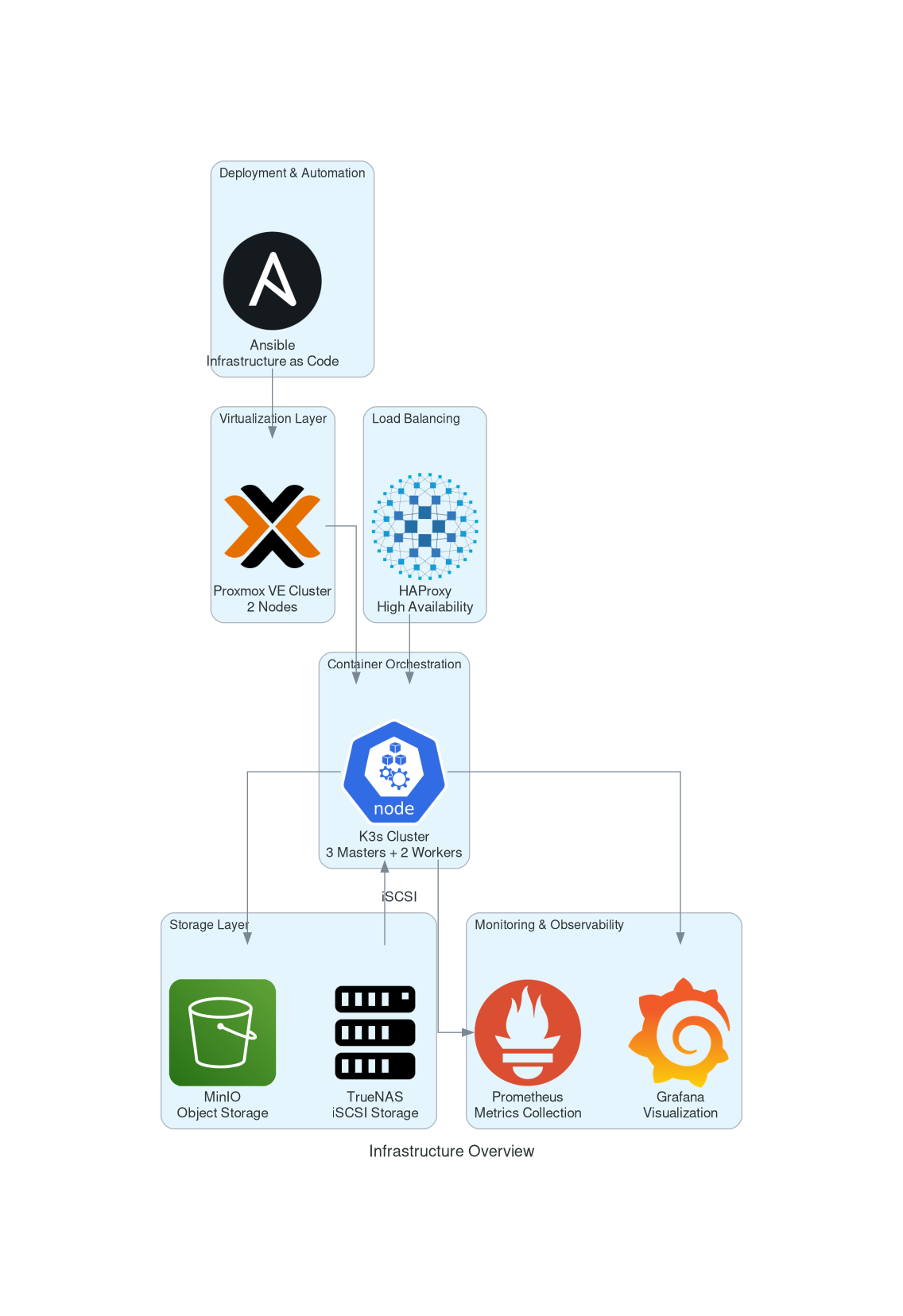
- Physical Layer: Proxmox VE cluster on dedicated hardware
- Virtualization Layer: VMs running various services
- Container Layer: K3s Kubernetes cluster
- Application Layer: Containerized applications
- Data Layer: Storage and databases
- Network Layer: Load balancing and ingress
- Security Layer: Authentication and authorization
Key Components
Infrastructure:
- Proxmox VE: Virtualization platform (2 nodes)
- K3s: Lightweight Kubernetes distribution (3 masters, 2 workers)
- HAProxy: Load balancer with high availability
- TrueNAS: Network-attached storage with ZFS
Core Services:
- ArgoCD: GitOps continuous deployment
- Prometheus: Metrics collection and monitoring
- Grafana: Visualization and dashboards
- Authelia: Single sign-on and authentication
- cert-manager: SSL certificate management
- Harbor: Container registry
Applications:
- Home Assistant: Home automation
- Gitea: Git repository hosting
- Vault: Secret management
- MinIO: Object storage
- Various exporters: Metrics collection
Access and Security
Initial Access Setup
1. SSH Access:
# Generate SSH key pair
ssh-keygen -t ed25519 -C "your.email@example.com"

# Add public key to authorized_keys on jump host
ssh-copy-id -i ~/.ssh/id_ed25519.pub user@192.168.1.210
2. Kubernetes Access:
# Copy kubeconfig from master node
scp user@192.168.1.210:~/.kube/config ~/.kube/config

# Test access
kubectl get nodes
kubectl get pods -A
3. ArgoCD Access:
# Login to ArgoCD
argocd login argocd.home.dodwell.us

# List applications
argocd app list

# Get application details
argocd app get grafana
Security Practices
Authentication:
- All services use Authelia for SSO
- 2FA enabled for critical services
- LDAP backend for user management
- OIDC integration for applications
Authorization:
- RBAC enforced in Kubernetes
- Role-based access in ArgoCD
- Principle of least privilege
- Regular access reviews
Network Security:
- Firewall rules at router level
- Network policies in Kubernetes
- Encrypted communications (TLS)
- VPN access for remote work
Service Access URLs
Core Services:
- ArgoCD:
https://argocd.home.dodwell.us - Grafana:
https://grafana.home.dodwell.us - Prometheus:
https://prometheus.home.dodwell.us - Harbor:
https://harbor.home.dodwell.us - Authelia:
https://auth.home.dodwell.us - MinIO:
https://minio.home.dodwell.us
Infrastructure:
- Proxmox:
https://proxmox.home.dodwell.us - TrueNAS:
https://truenas.home.dodwell.us - Router:
https://router.home.dodwell.us
Daily Operations
Morning Checklist
Infrastructure Health:
# Check cluster nodes
kubectl get nodes

# Check pod status
kubectl get pods -A | grep -v Running | grep -v Completed

# Check persistent volumes
kubectl get pv | grep -v Bound

# Check certificate status
kubectl get certificate -A
Service Health:
# Check ArgoCD applications
argocd app list | grep -v Healthy

# Check Prometheus targets
curl -s http://prometheus.home.dodwell.us/api/v1/targets | jq '.data.activeTargets[] | select(.health != "up")'

# Check Grafana dashboards
curl -s -H "Authorization: Bearer $GRAFANA_TOKEN" https://grafana.home.dodwell.us/api/search
Monitoring Dashboard
Key Metrics to Watch:
- Cluster Health: Node status, pod failures
- Resource Usage: CPU, memory, disk utilization
- Application Performance: Response times, error rates
- Security: Failed authentications, certificate expiry
- Storage: Disk usage, iSCSI connections
Grafana Dashboards:
- Infrastructure Overview: High-level cluster health
- Application Performance: Service-specific metrics
- Security Dashboard: Authentication and access logs
- Storage Dashboard: Disk usage and performance
Routine Maintenance
Weekly Tasks:
# Update system packages
ansible all -i inventories/proxmox.yml -m apt -a "update_cache=yes upgrade=yes"

# Check backup status
./scripts/check-backups.sh

# Review certificate expiry
kubectl get certificate -A -o custom-columns=NAME:.metadata.name,NAMESPACE:.metadata.namespace,READY:.status.conditions[0].status,EXPIRES:.status.notAfter

# Check for security updates
./scripts/security-updates.sh
Monthly Tasks:
- Security patch review
- Capacity planning assessment
- Backup restore testing
- Documentation updates
- Access review and cleanup
Development Workflow
GitOps Process
1. Code Changes:
# Clone repository
git clone https://gitea.home.dodwell.us/exodus/homelab.git.git
cd homelab

# Create feature branch
git checkout -b feature/new-service

# Make changes
vim k3s/apps/new-service/base/deployment.yaml

# Commit changes
git add .
git commit -m "Add new service deployment"

# Push to remote
git push origin feature/new-service
2. Review Process:
- Create pull request on Gitea
- Automated testing with Gitea Actions
- Code review by team members
- Merge to main branch
3. Deployment:
- ArgoCD detects changes automatically
- Syncs applications based on Git state
- Health checks validate deployment
- Rollback if issues detected
Adding New Services
Service Deployment Template:
# k3s/apps/new-service/base/kustomization.yaml
apiVersion: kustomize.config.k8s.io/v1beta1
kind: Kustomization

resources:
- namespace.yaml
- deployment.yaml
- service.yaml
- configmap.yaml

commonLabels:
  app: new-service
  component: application
  environment: base
ArgoCD Application:
# k3s/apps/new-service/argocd-app.yaml
apiVersion: argoproj.io/v1alpha1
kind: Application
metadata:
  name: new-service
  namespace: argocd
spec:
  project: applications
  source:
    repoURL: https://gitea.home.dodwell.us/exodus/homelab.git
    targetRevision: HEAD
    path: k3s/apps/new-service/overlays/local
  destination:
    server: https://kubernetes.default.svc
    namespace: new-service
  syncPolicy:
    automated:
      prune: true
      selfHeal: true
    syncOptions:
    - CreateNamespace=true
Testing Procedures
Pre-deployment Testing:
# Validate manifests
kubectl apply --dry-run=client -f k3s/apps/new-service/base/

# Security scanning
kube-score score k3s/apps/new-service/base/*.yaml

# Lint configuration
yamllint k3s/apps/new-service/base/
Post-deployment Testing:
# Check deployment status
kubectl get deployment new-service -n new-service

# Test service endpoints
curl -f https://new-service.home.dodwell.us/health

# Check logs
kubectl logs -f deployment/new-service -n new-service
Troubleshooting Guide
Common Issues and Solutions
Pod Not Starting:
# Check pod events
kubectl describe pod POD_NAME -n NAMESPACE

# Check logs
kubectl logs POD_NAME -n NAMESPACE

# Check resource constraints
kubectl top pods -n NAMESPACE
Service Not Accessible:
# Check service endpoints
kubectl get endpoints SERVICE_NAME -n NAMESPACE

# Check ingress configuration
kubectl describe ingress INGRESS_NAME -n NAMESPACE

# Test internal connectivity
kubectl run -it --rm debug --image=busybox --restart=Never -- wget -qO- http://SERVICE_NAME.NAMESPACE.svc.cluster.local
ArgoCD Sync Issues:
# Check application status
argocd app get APPLICATION_NAME

# Manual sync
argocd app sync APPLICATION_NAME --force

# Check repository access
argocd repo get https://gitea.home.dodwell.us/exodus/homelab.git
Escalation Procedures
When to Escalate:
- Multiple service failures
- Security incidents
- Data loss concerns
- Infrastructure failures
- Unknown issues
Escalation Steps:
- Document the issue
- Gather relevant logs
- Notify team lead
- Prepare for handoff
- Follow up on resolution
Knowledge Base
Documentation Structure
Infrastructure Documentation:
- Networking: Network topology and configuration
- Security: Authentication, authorization, certificates
- Storage: Persistent volumes, backup strategies
- Monitoring: Metrics, alerting, dashboards
Service Documentation:
- Deployment: GitOps workflows, CI/CD
- Operations: Daily tasks, maintenance procedures
- Troubleshooting: Common issues and solutions
Learning Resources
Internal Resources:
- Wiki: This documentation site
- Runbooks: Operational procedures
- Architecture Diagrams: System design documents
- Monitoring Dashboards: Real-time system status
External Resources:
Best Practices
Operational Excellence:
- Follow documented procedures
- Test changes in development first
- Monitor system health continuously
- Document all changes
- Practice disaster recovery
Security:
- Use principle of least privilege
- Rotate secrets regularly
- Monitor for anomalies
- Keep systems updated
- Follow security policies
Development:
- Use GitOps for all changes
- Write comprehensive tests
- Document new features
- Follow coding standards
- Collaborate through reviews
Next Steps
First Week Goals
Day 1-2: Environment Setup
- Install required tools
- Configure access to all services
- Explore documentation
- Shadow daily operations
Day 3-4: Hands-on Experience
- Deploy a simple application
- Perform basic troubleshooting
- Review monitoring dashboards
- Practice backup procedures
Day 5: Integration
- Participate in team meetings
- Contribute to documentation
- Identify improvement opportunities
- Complete knowledge assessment
First Month Goals
Week 1-2: Foundation
- Master basic operations
- Understand system architecture
- Build troubleshooting skills
- Contribute to team processes
Week 3-4: Advanced Topics
- Deep dive into specific services
- Contribute to development projects
- Mentor future team members
- Propose system improvements
Ongoing Development
Continuous Learning:
- Stay updated with technology trends
- Participate in training programs
- Contribute to open source projects
- Share knowledge with the team
Career Growth:
- Develop specialized expertise
- Lead improvement initiatives
- Mentor junior team members
- Contribute to strategic planning
Support and Resources
Getting Help
Immediate Support:
- Team chat channel
- On-call procedures
- Escalation matrix
- Emergency contacts
Documentation:
- Wiki searches
- Runbook references
- Architecture diagrams
- API documentation
Community:
- Internal forums
- Knowledge sharing sessions
- Team retrospectives
- External conferences
Feedback and Improvement
Feedback Channels:
- Regular team meetings
- Documentation updates
- Process improvement suggestions
- Tool and automation requests
Continuous Improvement:
- Post-incident reviews
- Process optimization
- Tool evaluation
- Training needs assessment
Welcome to the team! This homelab represents a sophisticated infrastructure that requires continuous learning and improvement. Your contributions will help maintain and enhance this environment while developing your skills in modern infrastructure management.
Remember: When in doubt, ask questions. The team is here to support your success and the success of the homelab.
Feedback
Was this page helpful?
Glad to hear it! Please tell us how we can improve.
Sorry to hear that. Please tell us how we can improve.